
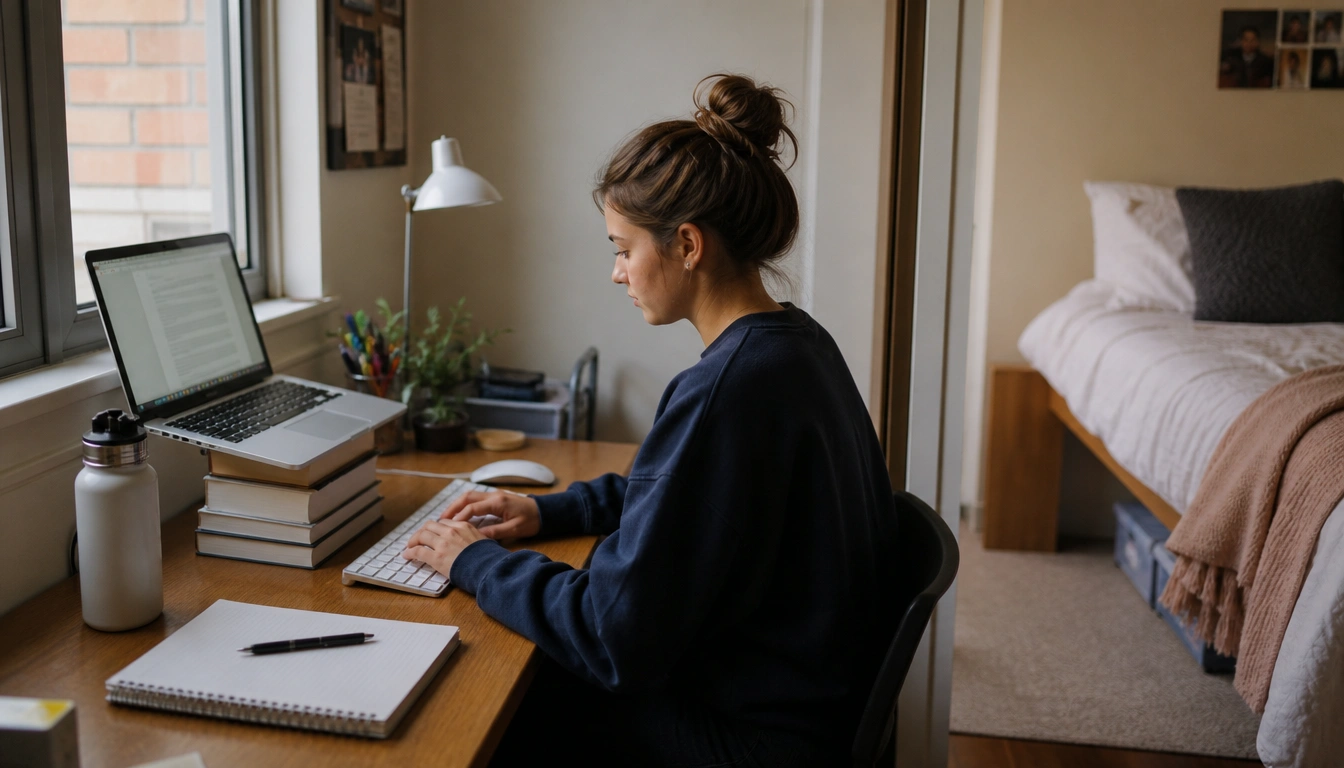
You can study effectively from home by treating your day like a sequence of short, purposeful blocks: start with a clear morning ritual, work in focused sessions, take brief movement breaks every 30 to 60 minutes, and end with a shutdown routine. Set up your space so your screen, chair, and tools support neutral posture, and use separate cues for study time and rest time. If pain, numbness, burnout, or sleep problems keep building, get professional help.
Key Takeaways
- A commute may be gone, but a simple start and end ritual can still help your brain switch into and out of study mode.
- You do not need a perfect office. A dorm room, shared apartment, or bedroom can still support studying if you create small functional zones.
- Laptop-only setups often cause neck strain, so raising the screen and using an external keyboard or mouse can make a real difference.
- Short movement resets every 30 to 60 minutes help reduce the strain of long sitting sessions and screen-heavy work.
- Persistent pain, numbness, worsening burnout, or sleep disruption are signs that routine changes may not be enough.
Why a balanced work-from-home routine matters for college students
Remote and hybrid classes can save travel time, but they also remove the natural structure that helps many students stay organized. Without a commute, classroom schedule, or campus environment, it is easy to drift between studying, resting, and scrolling. That can lead to longer sitting time, more awkward laptop postures, and a harder time mentally “leaving” school work behind. The CDC and other public health bodies emphasize reducing prolonged sedentary time and breaking up sitting with movement whenever possible.
A balanced work-from-home routine for college students is not about being rigid. It is about building enough structure to protect your body and brain. The goal is to make studying easier to start, easier to sustain, and easier to stop. When your routine is predictable, you spend less energy deciding what to do next and more energy actually learning.
This matters even more if you study in a bedroom, dorm, or shared apartment. In those spaces, the boundary between “student mode” and “off mode” can blur fast. A practical routine gives your day shape even when your environment does not.
A student-friendly daily framework
Think of the day in four parts: a morning reset, focus blocks, movement breaks, and a shutdown ritual. This gives you a simple pattern without forcing a strict hour-by-hour schedule.
Morning reset: Before opening class apps or email, do one small action that signals the start of study time. That might be changing clothes, washing your face, making tea, opening curtains, or taking a short walk. A commute is often the missing piece in remote learning, so this ritual replaces that “transition” effect.
Focus blocks: Work in chunks that match your attention span. Some students do well with longer blocks, while others need shorter sprints. During a block, keep one task in front of you instead of splitting attention across notes, messages, and videos. This reduces decision fatigue and makes progress feel more concrete.
Movement breaks: After 30 to 60 minutes of sitting, stand up briefly. Walk to the kitchen, roll your shoulders, stretch your chest, or look into the distance for a minute. You do not need a full workout for this to help. The point is to interrupt static posture before stiffness builds.
Shutdown ritual: End the academic part of the day on purpose. Close tabs, put away notes, charge your laptop, and do one non-school action that marks the transition out of work mode. A second short walk, a shower, or a change of seat can help your brain stop treating the evening like unfinished class time.
Ergonomics that actually work in dorms, bedrooms, and shared spaces
Ergonomics sounds technical, but the basics are straightforward: keep your body in a position that reduces strain while you study. Public health and occupational guidance commonly point to a neutral posture, where the screen, arms, and back are supported instead of folded into awkward angles.
Start with your screen. The top of the display should sit at or slightly below eye level so you are not constantly looking down. Your elbows should be close to a bent, relaxed angle, and your wrists should stay straight rather than bent upward. Your feet should rest flat on the floor or on something stable.
If you are studying from a bed or couch, the issue is not moral failure or laziness; it is that those surfaces make neutral posture harder to maintain. A couch can work for a short review session, but it is usually not the best place for long writing or lecture days. If you do not have a true desk, try to at least create one reliable sit-up workspace, even if it is temporary.
For students living in small rooms, the most useful ergonomic upgrade is often the simplest one: use the surface that lets you sit upright the longest with the least effort. That might be a small desk, dining table, library carrel, or even a clear section of counter space.
How to build boundaries when your study space is also your rest space
When one room has to do everything, boundaries need to be created with cues, not square footage. The brain responds to repeated signals. Over time, those signals help separate studying from resting, even if the room itself never changes.
Try to give study time a consistent opening cue and a consistent closing cue. The opening cue can be as small as plugging in your laptop and putting on headphones. The closing cue can be closing your notebook and moving your charger to a different spot. These actions are small, but they help create a mental edge between school and personal life.
If possible, assign different uses to different spots. For example, use your desk or table for classes and assignments, and keep your bed for sleep and rest. If that is not realistic every day, keep the rule as a tendency rather than a perfection test. Even small separations can help reduce the feeling that school is everywhere all the time.
Shared spaces need extra communication. If you live with roommates or family, a simple heads-up about your most focused hours can reduce interruptions. Noise-canceling headphones, a visible study signal, or agreed quiet periods can make a bigger difference than people expect.
Low-cost setup fixes for laptop-only students
A laptop alone is workable, but it usually pulls your head and shoulders forward. That is why laptop-only studying often leads to neck and upper back discomfort over time. You do not need expensive gear to improve it.
The highest-value fix is to raise the screen closer to eye level. A stack of sturdy books, a box, or a simple stand can do the job. If the laptop is elevated, use an external keyboard and mouse so your hands stay near table height instead of reaching up toward the screen.
If you cannot buy accessories right away, start with what you have. Put the laptop on a stable surface, keep the keyboard area clear, and bring your chair close enough that you are not leaning forward. If your feet dangle, use a small box, another stack of books, or a stable footrest so your lower body is supported too.
Lighting matters as well. If you are squinting or leaning in to read, you are likely making posture worse. Aim for enough light that you can see your work without craning toward the screen. Even a low-cost desk lamp or a better room position can help.
One useful test: if your setup makes you constantly think about your body instead of your schoolwork, it probably needs adjustment.
How to adapt the routine for different energy patterns, attention needs, or health limits
No single routine fits every student. Some people focus best in long morning stretches, while others do better in short bursts later in the day. Students with ADHD, chronic fatigue, pain conditions, or other health needs often need a routine that is more flexible, not less structured.
If attention is difficult, shorten the work block and make the start smaller. A five-minute setup, one assignment, or one page of notes can be enough to build momentum. If energy is limited, place your hardest task during your best window and save lower-demand work for low-energy periods.
Students who need pacing support may benefit from alternating mental work with physical resets more often than once per hour. That is not a failure of discipline. It is a strategy that matches the body’s needs. The same is true if you need to work from a reclined position for a medical reason or if your schedule has to be built around symptoms, medication timing, or caregiving duties.
The practical goal is consistency, not sameness. A routine is useful when it helps you keep going without wiping you out.
Warning signs that the routine is causing strain instead of helping
Some discomfort is a normal response to long study days, but certain symptoms mean your setup or workload needs more attention. Watch for neck, shoulder, or back pain that keeps returning, especially if it gets worse during study sessions.
Seek professional evaluation if you develop pain that radiates into an arm or leg, numbness, tingling, or persistent weakness. Those symptoms can point to nerve irritation or another issue that should not be managed with posture changes alone.
Mental strain matters too. If your routine leaves you feeling constantly burned out, unable to sleep, or stuck in a cycle of dread around schoolwork, it is time to take that seriously. Campus counseling, student health services, a primary care clinician, a physical therapist, or an occupational health professional may be able to help you adjust the load and the environment.
If you have an existing musculoskeletal condition, chronic fatigue, or another health issue, personalized guidance is usually more helpful than generic ergonomics advice. A better routine should make life more manageable, not harder to sustain.
A realistic sample routine for a remote college day
Here is one way a balanced day might look without pretending every student has the same classes or energy level.
| Part of day | Example routine | Why it helps |
|---|---|---|
| Start | Get dressed, open curtains, take a short walk or stretch, then sit down at your study spot | Creates a clear transition into school mode |
| First block | Focus on your most demanding class task for a set period | Uses your freshest attention early |
| Reset | Stand up, walk briefly, drink water, look away from the screen | Breaks up static sitting and eye strain |
| Second block | Finish readings, problem sets, or discussion posts | Keeps momentum without forcing nonstop sitting |
| Midday | Eat, move around, and work from a different spot if needed | Restores energy and reduces monotony |
| Late block | Use a lighter task or review session | Matches lower afternoon energy |
| Shutdown | Save work, close tabs, put materials away, then do a non-school activity | Protects rest time and reduces mental spillover |
This kind of day is not about perfect discipline. It is about creating enough structure that your body gets breaks, your work gets attention, and your evening still feels like your own.
Frequently Asked Questions
How often should I take breaks from sitting while studying at home?
A good practical target is to interrupt sitting every 30 to 60 minutes. The break does not need to be long. Stand up, change position, walk a little, or do a few shoulder rolls. The main goal is to avoid staying in one posture for hours at a time.
What is the best laptop setup for a college student with limited space?
Use a stable surface, raise the screen toward eye level with books or a stand, and connect an external keyboard and mouse if possible. That lets your neck stay more neutral. If you can only change one thing, screen height is usually the most important first fix.
How can I separate study time from rest time when my dorm room or bedroom is also my living space?
Use consistent cues. Start study time with a small ritual, use one spot mainly for schoolwork, and end with a shutdown routine that clearly marks the day as over. Even simple signals, like closing your laptop and moving to another chair, can help create separation.
What should I do if I get neck, shoulder, or back pain from remote studying?
First, check your setup and reduce long uninterrupted sitting. If pain keeps coming back, gets worse, or starts radiating into your arms or legs, get evaluated by a healthcare professional. Numbness, tingling, or weakness should not be ignored.
How can I adapt a work-from-home routine if I have ADHD, chronic fatigue, or another condition that affects focus and pacing?
Use shorter work blocks, more frequent resets, and the time of day when you usually feel best. It is okay to build a routine around pacing rather than endurance. If symptoms or fatigue are affecting school or sleep, personalized medical or behavioral support can help.
The Bottom Line
A strong remote-study routine does three things: it helps you start, helps you keep going without overload, and helps you stop. That usually means a simple morning transition, focused work blocks, regular movement breaks, and a clear shutdown habit.
Your setup does not need to be fancy to be effective. In a dorm, bedroom, or shared apartment, small changes like screen height, a better chair position, and a separate study cue can make studying more comfortable and sustainable. If pain, numbness, burnout, or sleep disruption keep building, treat that as a sign to ask for help rather than pushing through.
Medical disclaimer
Medical disclaimer: This content is for educational and informational purposes only and is not a substitute for professional medical advice, diagnosis, or treatment. Dietary needs and supplement suitability vary by individual.
