
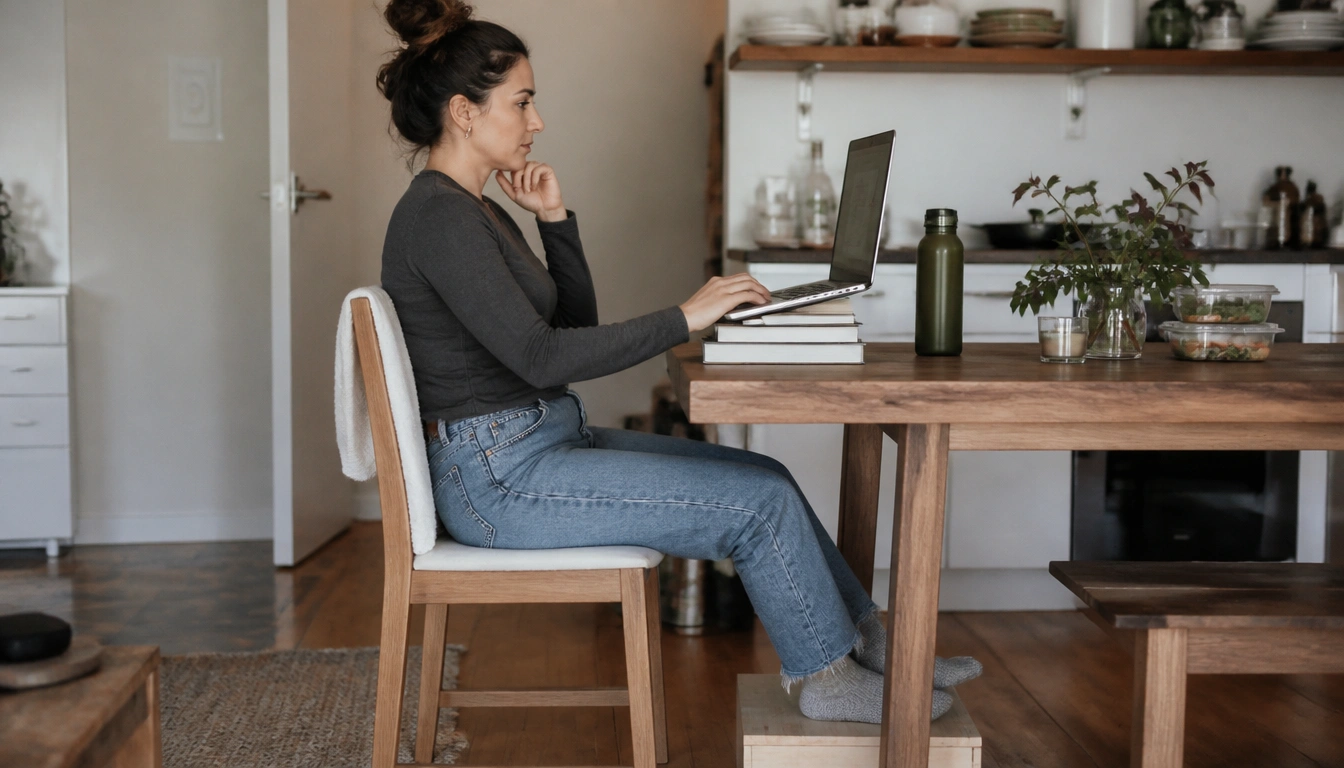
You can build a healthy, structured work-from-home routine on a tight budget by using household items for support, breaking up sitting time, planning low-cost meals and snacks, and setting clear start-and-end rituals. The goal is not a perfect office setup; it is a repeatable routine that reduces strain, grazing, and boundary drift without adding unnecessary spending.
Key Takeaways
- Use towels, cushions, boxes, and books to improve posture before buying ergonomic gear.
- Plan simple pantry-based lunches and portioned snacks to reduce both grazing and grocery costs.
- Take brief movement breaks during the day, especially during calls and long sitting stretches.
- Use a short morning cue and a hard end-of-day stop to separate work time from home time.
- Pay attention to persistent pain, headaches, burnout, or anxiety, since routine changes may not be enough.
Why WFH health and budget problems show up together
A budget-conscious work-from-home routine has to solve two problems at once: the body problem and the household-budget problem. When work happens at the kitchen table, on a couch, or in a bedroom corner, posture often gets worse, sitting time tends to stretch longer, and snacks are easier to reach. At the same time, home workers may spend more on electricity, more on convenience food, and more on small purchases that seem harmless in the moment but add up over the week.
That is why the best WFH routine is usually built from habits, not purchases. Public health guidance from the CDC and the NHS emphasizes routine, movement, and practical workstation adjustments rather than expensive equipment. If your setup is simple and shared, the aim is to make it more functional with what you already own.
Think of the routine as a chain: a clear start to the day, a more comfortable workstation, regular movement, better food decisions, and a firm stop at the end of work. Each link helps the others.
Set the tone before work starts
The easiest way to make work feel contained is to begin it the same way most days. Consistent wake times help your body clock settle, and a repeatable pre-work sequence can reduce the feeling that work has spilled into the whole day. A short walk outside, a few minutes of stretching, or even pacing the hallway can serve as a low-cost replacement for the commute.
That “commute replacement” does not need to be long. The point is to create a mental transition. Change clothes, get water, open curtains, and move for a few minutes before checking messages. This tells your brain that the workday has begun instead of letting work drift in while you are still in sleep mode.
If mornings are busy, keep the routine small: wake, wash up, move briefly, and sit down with your first task already chosen. A simple plan reduces decision fatigue and can help you avoid wandering into snacks, chores, or social media before the day has started.
Build a better workstation with what you already own
You do not need a full office chair to improve a workstation. The first goal is to support the back, feet, and screen so your body is not fighting the setup all day. If your chair is hard or too low, a folded towel or cushion can support the small of your back. If your feet dangle, place a sturdy box or thick book under them so your legs feel grounded.
Screen height matters too. The top of the screen should be close to eye level so you are not spending the whole day looking down. A stack of stable books can raise a laptop, and a separate keyboard and mouse can help keep your shoulders, wrists, and neck in a more neutral position. That is often a more effective budget upgrade than a new chair.
If you use a laptop for most tasks, avoid balancing it on unstable items or soft bedding. A firm table is better, even if it is the kitchen table. Check that your elbows are near your sides and your shoulders are relaxed. Small improvements in alignment can make long days feel less punishing.
For people who share space, the most useful upgrades are the cheapest ones: lumbar support from a towel, foot support from a box, and a lifted screen from books. According to occupational health guidance summarized by the CDC and NHS, reducing awkward posture and supporting the lower body are basic ways to lower strain over time.
Interrupt sitting before it starts to feel normal
Long stretches of sitting are hard on both comfort and energy. The answer is not a big workout during the workday; it is brief, regular interruptions. Stand up roughly once an hour if you can, even if it is only for a minute or two. Walk to refill water, stretch your chest, roll your shoulders, or simply change position.
Calls and meetings are a good place to build in movement. If you do not need to type, stand during the call. If you are listening rather than presenting, pace slowly or shift weight from foot to foot. These small actions help break up sedentary time without demanding a special routine or extra equipment.
A practical micro-break can be very short: stand, look away from the screen, open your hands, rotate your neck gently, and sit back down. You do not need to turn every break into a workout. The goal is to stop the body from locking into one posture for too long.
If you are already dealing with neck, back, wrist, or shoulder discomfort, aim for more frequent position changes rather than fewer, larger breaks. That is especially useful in small homes where there may not be space for a full exercise setup.
Make meals and snacks work for a home office budget
Working from home can create a new version of the workplace snack trap. The difference is that the pantry may be closer than the office vending machine. Without a plan, grazing can become a default response to boredom, stress, or screen fatigue, and grocery spending can creep up as a result.
A low-cost solution is to plan from staples. Beans, lentils, oats, rice, pasta, eggs, frozen vegetables, fruit, plain yogurt, and peanut butter can anchor inexpensive lunches and snacks. Batch cooking helps here: make one large pot of soup, chili, grain bowls, or roasted vegetables that can be reused for a few days. That saves both time and money while lowering the urge to order lunch or snack continuously.
Pre-portion snacks instead of eating from the package. Put apples, carrots, crackers, nuts, yogurt, or leftovers into single-serve containers or small bowls before the workday gets busy. Keep water nearby too. Sometimes what feels like hunger is really thirst, fatigue, or a need for a short break.
A helpful habit is to separate “food for work” from “food in reach.” If possible, keep highly tempting snacks out of your desk area and place easier options where you can see them first. You do not need special diet products. You need a routine that makes the cheaper choice the easier choice.
WFH can also nudge household costs in other directions. More hours at home may increase electricity use, heating or cooling, and dishwashing. You do not have to micromanage every small cost, but it helps to batch tasks, turn off equipment when not needed, and avoid letting “working from home” turn into all-day consumption. A planned lunch and a filled water bottle can do more for your budget than a cabinet full of specialty items.
Adapt the routine to shared and small spaces
Not everyone has a spare room, and many people work from a kitchen table, bedroom corner, or shared living area. The answer is usually not a bigger setup; it is clearer boundaries inside a smaller one. If you work at a shared table, use a tray, basket, or box to store your work items so you can set them aside at the end of the day.
In a bedroom, try to keep the working surface visually distinct from sleep space. That might mean facing the desk away from the bed, using a lamp that is only on during work hours, or storing work materials in one container that gets closed when the day is done. The point is to reduce the sense that work is everywhere all the time.
In a multi-person household, communication matters. Let others know when you are on a call, when you are taking a break, and when the workday ends. Even a small household agreement can prevent constant interruption and reduce stress. If surfaces are shared, keep a small “reset” routine for clearing your area so the room can return to normal quickly.
If you have limited space, avoid chasing an ideal office image. Focus on a stable chair height, a lifted screen, a place for your feet, and a daily reset habit. Those changes are usually more important than whether the setup looks professional.
Watch for pain, headaches, and burnout that need more than routine changes
Some discomfort is a sign that your setup needs adjustment. Persistent sharp pain, radiating pain into the arms or legs, ongoing wrist symptoms, frequent headaches, or worsening back and neck pain should not be brushed off as normal work stress. If you are having trouble doing ordinary tasks or the pain keeps returning despite changes to posture and breaks, it is time to speak with a healthcare professional.
The same is true for mental strain. Remote work can save money and time, but it can also blur the line between work and recovery. If you are feeling isolated, unusually anxious, emotionally flat, or burned out, basic routine changes may not be enough. Professional support may help you address sleep, stress, workload, or anxiety before the problem grows.
For people with existing joint problems, chronic pain, or mental health concerns, the best WFH plan is one that is adapted to the person, not copied from a generic checklist. A physical therapist, occupational health clinician, primary care clinician, or mental health professional can help if self-management is not improving things.
Close the day with a hard stop
Ending work cleanly matters almost as much as starting it well. A hard stop protects sleep, family time, and mental recovery. Choose a realistic time to shut down, finish the task you are on, close the laptop, plug in devices, and put work materials away. The exact time matters less than the consistency.
A short end-of-day reset can help you switch out of work mode: write tomorrow’s first task, clear the desk, refill water, and do a brief stretch or walk. If you normally move directly from work to chores or entertainment, add one transition step that marks the end of the workday. That small ritual can reduce the urge to keep checking email or thinking about unfinished tasks late into the evening.
Protecting sleep is part of the budget plan too. Poor sleep can make snacking, stress spending, and low-energy days more likely. A consistent shutdown routine is one of the cheapest health tools available, and it supports the rest of your WFH routine by making the next day easier to start.
Frequently Asked Questions
How do I make a kitchen table or shared space work as a safe home workstation?
Use the most stable surface available, then improve posture with household items: a cushion or rolled towel for lower-back support, a box for foot support, and books to raise the screen. Keep the setup tidy so it can be cleared quickly when the space is shared.
What are the cheapest ways to improve WFH ergonomics without buying special furniture?
Start with free or low-cost changes: adjust chair height with cushions, support your feet with a box or thick book, raise your laptop with sturdy books, and use an external keyboard and mouse if you have them. Small changes often matter more than new furniture.
How can I avoid constant snacking and higher grocery costs when working from home?
Plan lunch and snacks before the workday starts. Batch cook simple meals, keep cheap staples on hand, and pre-portion snacks so you are not eating straight from the package. Keeping water nearby also helps you avoid mistaking thirst or boredom for hunger.
How often should I take movement breaks during the workday?
A brief break about once an hour is a practical target for many people. Stand, stretch, or walk for a minute or two, and use calls or meetings as opportunities to stand or pace when you do not need to type.
What simple start-of-day and end-of-day habits help separate work from home life?
At the start of the day, use a short commute replacement like a walk, stretch, or change of clothes before checking messages. At the end of the day, close the laptop, put work items away, and do one short reset so your brain gets a clear signal that work is over.
The Bottom Line
A healthy WFH routine on a budget is mostly about structure: a short morning transition, a workable household-item workstation, regular movement breaks, and low-cost food planning. You do not need a full office or expensive gear to make the day easier on your body and your wallet.
The most useful changes are often the simplest ones: support your back and feet, raise your screen, stand up often, plan cheap meals, and stop work at a set time. If pain, headaches, burnout, or anxiety keep getting worse, routine changes alone may not be enough and professional support is worth seeking.
Medical disclaimer
Medical disclaimer: This content is for educational and informational purposes only and is not a substitute for professional medical advice, diagnosis, or treatment. Dietary needs and supplement suitability vary by individual.
Sources
- National Health Service (NHS) — uhsussex.nhs.uk. Accessed October 2026.
- Centers for Disease Control and Prevention (CDC) — cdc.gov. Accessed October 2026.
- National Health Service (NHS) — oxfordhealth.nhs.uk. Accessed October 2026.
- National Health Service (NHS) — www.nhs.uk. Accessed October 2026.
