
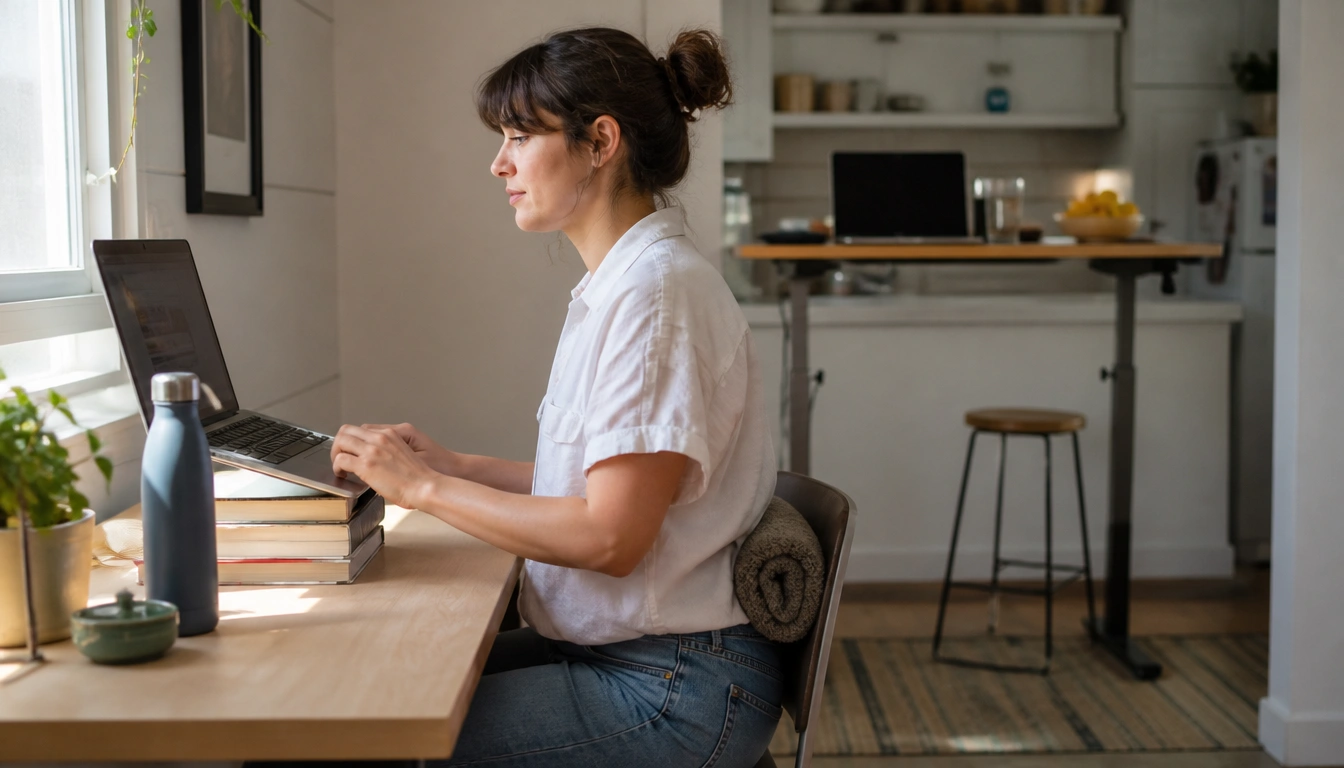
The cheapest effective things you can do are to break up sitting often, improve your laptop and chair setup with simple household items, protect your eyes with regular screen breaks, and make snack and meal timing less automatic. A few low-cost habits—like movement snacks, towel lumbar support, a book stack for screen height, and putting snacks out of arm’s reach—can help you feel better without buying a full home office setup.
Key Takeaways
- Short movement breaks and “movement snacks” can help you sit less without needing a formal workout block.
- A rolled towel, books, a box, or a kitchen counter can improve ergonomics for very little or no cost.
- Changing snack placement, meal timing, and screen habits can reduce mindless grazing more reliably than willpower alone.
- The 20-20-20 rule and meeting-time standing or walking help reduce eye strain and prolonged sitting.
- If you have chronic pain, prior injuries, or red-flag symptoms, generic home-office advice may not be enough and you may need individualized care.
Remote-work-specific health risks that cheap habits can help with
Remote work often changes how people move, eat, and look at screens. You may sit longer because there is no commute, take fewer natural walking breaks, and stay close to the kitchen for most of the day. That can lead to stiffness, neck and back discomfort, eye strain, and more snacking simply because food is nearby. Public health guidance from the CDC and the U.S. Department of Health and Human Services emphasizes that some physical activity is better than none and that adults should limit sedentary time when possible.
The good news is that many helpful changes cost little or nothing. You do not need perfect posture, a standing desk, or a gym membership to make progress. The most useful approach is to make the healthier choice easier to repeat during a normal workday. That means using small environmental changes and routine triggers instead of relying on motivation alone.
Think in terms of friction. If it takes extra effort to stand up, stretch, or eat away from your desk, you will probably do it less often. If your water bottle is visible, your snack is not right next to your keyboard, and your laptop is positioned more comfortably, healthy choices become more automatic.
Low-cost movement habits across the workday
For remote workers, the cheapest movement strategy is often not a workout plan but a pattern of short interruptions. Micro-bouts and movement snacks can be as simple as standing up during a call, walking to refill water, doing a few squats while coffee brews, or taking a lap through your home between tasks. These brief bouts are useful because they reduce long uninterrupted sitting, which is the real issue for many desk workers.
If a full exercise session feels unrealistic on busy days, break movement into small pieces. A few minutes of brisk walking before the workday, a short walk after lunch, and another walk after work can add up. You can also use routine triggers: each time a meeting ends, do calf raises; each time a file uploads, stretch your chest and shoulders; each time you finish a task, stand and reset your posture. This kind of habit pairing is easier to maintain than trying to “find time” later.
Virtual meetings are another chance to move more without changing your schedule. If a meeting does not require you to be on camera or take notes continuously, stand, pace, or stretch during the call. Audio-only meetings are especially useful for this. Even if you cannot leave your desk for long, simply alternating between sitting and standing during the day can reduce how static your body feels.
Public health targets still matter. CDC and HHS guidance for adults includes at least 150 minutes of moderate-intensity aerobic activity per week plus muscle-strengthening activities on at least 2 days per week. For remote workers, that goal can be reached through ordinary walking, bodyweight movements, and short home routines divided across the week. The budget-friendly version is consistency, not intensity.
Budget ergonomics for common home setups
Good ergonomics do not require buying a full office setup. Start with the parts of your body that feel the strain first. If your lower back gets tired, a rolled towel or small firm pillow behind your waist can help support the natural curve of your spine. If your feet dangle, use a box, thick book, or sturdy stack of books as a footrest so your feet can rest flat and your hips feel more supported.
Laptop users often bend their necks too far forward because the screen sits low. A simple fix is to place the laptop on a stable stack of hardcover books or other firm objects so the top of the screen is closer to eye level. If you already have a separate keyboard and mouse, that makes the setup easier to use. If you do not, even a temporary raise in screen height can help reduce the habit of hunching.
The safest budget setup usually follows a few basic goals: feet supported, knees and hips in a comfortable angle, shoulders relaxed, and the screen high enough that you are not constantly looking down. A kitchen counter can work as a temporary standing option for a short block of time, especially if you want to break up sitting without purchasing anything. Use it for 20 to 30 minutes at a time, then return to sitting if that feels better.
If your chair is the problem, do the cheapest useful fix first. Add lumbar support before shopping for a new chair. If the chair is too high, use a footrest. If the work surface is too low, raise the screen rather than bending your spine to meet it. These small changes often help more than buying accessories before you understand what is actually uncomfortable.
Screen comfort and eye-strain reduction
Long screen days can leave your eyes tired, dry, or achy, and they can also trigger headaches. One of the simplest habits is the 20-20-20 rule: every 20 minutes, look at something about 20 feet away for at least 20 seconds. That brief distance break helps relax the focusing system of the eyes and interrupts the fixed stare that comes with work screens.
You do not need a timer obsession to use it. Tie the habit to something that already happens often, such as sending an email, finishing a meeting, or reaching for water. If you prefer, use any consistent cue that reminds you to look away from the screen and blink fully a few times. Regular blinking matters because people often blink less while concentrating.
Screen positioning also affects comfort. Try to keep the top of the screen near eye level and the device at a distance that lets you read without leaning in. If you use a laptop on a table or counter, make sure you are not craning your neck upward or downward for long periods. Small changes in screen height and viewing distance can reduce the “working hard just to see the screen” feeling.
Natural light can help, but glare can also make symptoms worse. If your screen reflects a window or bright lamp, shift your setup slightly before buying anything. The cheapest fix is often a change in angle rather than a new product.
Food-first and habit-first nutrition strategies
Remote work makes grazing easy because the kitchen is close and snacks are visible. The most effective low-cost strategy is to reduce the number of automatic decisions. Put snacks out of immediate reach of your desk, store them in the kitchen rather than beside you, and pre-portion what you plan to eat. If you have to stand up and walk to get food, you are more likely to pause and decide intentionally.
Meal timing matters too. A real lunch break helps more than eating while answering messages. When possible, close the laptop, step away from the screen, and sit somewhere else to eat. That shift makes it easier to notice fullness cues and less likely that stress or boredom will push you to keep eating after you are satisfied.
Planning a few simple foods can also keep costs down. Fruit, cut vegetables, yogurt, eggs, nuts, or leftovers are often cheaper and more filling than frequent convenience snacks. You do not need a special remote-work meal plan. You need a predictable option that prevents the “I am hungry, bored, and already beside the pantry” problem.
Screen habits and snacking habits often overlap. Many people eat while scrolling or sitting through meetings without noticing how much they have consumed. If that sounds familiar, try a no-food-at-the-keyboard rule for one part of the day, such as the first hour of work or your lunch break. The goal is not perfection; it is to interrupt mindless eating enough that you can feel the difference.
Hydration and break cues that also reduce sitting time
Hydration is not a magic fix, but it can be a useful cue for standing up. Keep a water bottle or large glass visible at your desk and use it as a reason to get up, refill, and take a short walk to the kitchen or bathroom. That adds movement without requiring a separate reminder system.
You can also link drinking water to the flow of your day. For example, take a few sips before each meeting, after each meeting, or after finishing a focused task. The point is not to create a rigid hydration target inside your workday; it is to use a normal habit as a cue for standing and changing position.
If you tend to forget breaks when focused, combine hydration with other cues. A standing refill break after every hour of work, or after every long meeting, can reduce the amount of uninterrupted sitting. Even brief transitions matter because they break the feeling of being “glued” to the chair.
People sometimes overlook the value of restroom breaks as movement opportunities. If you are trying to sit less, that walk across the home and back can be part of the plan. Small, ordinary interruptions are often more sustainable than trying to force a major lifestyle overhaul during a busy workweek.
Who should go slower or get individualized advice
Generic remote-work advice works best for people with mild stiffness, ordinary fatigue, or simple setup problems. If you have chronic pain, a previous neck, back, shoulder, wrist, or hand injury, or a condition such as carpal tunnel syndrome, your body may need a more customized approach. The right chair height, screen position, or movement pattern may be different for you.
People returning from long periods of inactivity should also start gently. A few walks, light mobility work, and brief standing intervals may be a better starting point than jumping into intense workouts. If your baseline is low, the goal is to build tolerance first. That may mean shorter movement snacks, fewer repetitions, or less time at the kitchen counter until your body adapts.
If you notice that a particular position, stretch, or movement repeatedly makes symptoms worse, do not assume you just need to push through it. Remote-work ergonomics should reduce strain, not create new pain. A physical therapist, occupational health clinician, or physician can help you adapt a plan to your history and job demands.
It is also reasonable to ask for workplace accommodations if your symptoms are affecting your ability to work comfortably. A simple change in schedule, break pattern, or equipment may help more than trying harder.
When to seek care instead of self-managing
Some discomfort from a new or imperfect setup can improve with time and small changes, but not all symptoms should be managed at home. Stop and seek medical evaluation if you have sharp, shooting pain, numbness, tingling that travels into the arms or legs, chest discomfort, severe dizziness, or any symptom that feels sudden and unusual. Those signs need professional attention.
Persistent pain is another reason to get checked. If back, neck, wrist, or shoulder pain does not improve after a few weeks of ergonomic changes, rest, and basic habit adjustments, a clinician should evaluate it. Ongoing symptoms can reflect repetitive strain or another issue that will not resolve just by rearranging your desk.
Seek care sooner if pain is getting worse, if you are losing strength or function, or if the discomfort is affecting sleep or daily activities. Early advice can prevent a minor problem from turning into a long-term one.
For most remote workers, the safest path is to use low-cost changes early, monitor symptoms honestly, and escalate when the body says the issue is more than a normal adjustment period.
Frequently Asked Questions
How can I reduce back, neck, and wrist pain from working at home on a budget?
Start with the cheapest fixes first: support your lower back with a rolled towel, raise your laptop on books, and use a box or sturdy stack as a footrest if needed. Keep your elbows and wrists in a relaxed position, and change posture often rather than trying to hold one “perfect” position all day.
What are the best low-cost ways to move more during the workday if I sit for long hours?
Use movement snacks instead of waiting for a workout block. Stand during some calls, walk while listening to audio-only meetings, do a few squats or calf raises between tasks, and tie short movement breaks to common triggers like emails, uploads, or coffee refills.
How can remote workers avoid mindless snacking and overeating near the kitchen?
Make snacking less automatic. Keep food out of arm’s reach, pre-portion snacks, eat lunch away from the screen, and use a real break instead of grazing while working. A predictable meal schedule usually works better than trying to rely on willpower alone.
What are simple eye-strain fixes for long screen days at home?
Use the 20-20-20 rule, blink more often, and make sure your screen is not too low or too close. Reducing glare and looking away from the screen on a regular basis can also ease dry, tired eyes and headaches.
When should remote-work aches or fatigue be checked by a clinician instead of self-managed?
Get medical advice if you have sharp pain, numbness, tingling, chest discomfort, severe dizziness, weakness, or symptoms that keep worsening. If pain does not improve after a few weeks of basic changes, it is worth being evaluated rather than assuming it will go away on its own.
The Bottom Line
The cheapest healthy remote-work changes are usually the simplest ones: move more often, sit a little better, make screens easier on your eyes, and reduce automatic snacking. You can do a lot with books, a towel, a box, a water bottle, and a few short habits repeated through the day.
Start with one or two changes that fit your workday, then build from there. If you have chronic pain, prior injuries, or symptoms that do not improve, do not keep guessing—get individualized advice so your setup and routine actually match your body.
Medical disclaimer
Medical disclaimer: This content is for educational and informational purposes only and is not a substitute for professional medical advice, diagnosis, or treatment. Dietary needs and supplement suitability vary by individual.
Sources
- Centers for Disease Control and Prevention (CDC) — cdc.gov. Accessed November 2026.
- U.S. Government / Health Authority — health.gov. Accessed November 2026.
- National Institutes of Health (NIH) — nih.gov. Accessed November 2026.
- Centers for Disease Control and Prevention (CDC) — cdc.gov. Accessed November 2026.
